
Share this
by Emma Laxton on October 29, 2026
How do you build an HR tech stack for a growing organisation?
Start with a core HR information system (HRIS) as the single record for every employee, then connect payroll, absence and onboarding to it so data is only entered once. As headcount increases, add performance and training tools and a dedicated case management system for grievances, disciplinaries and other employee relations matters. Judge every tool on ease of use, integration, security under UK GDPR, reporting and the total cost of the stack, not the price of one product. Start with the problems you have, not the products.

Most HR tech stacks are not designed intentionally. They grow organically. A payroll package arrives with the first finance hire, an absence tool gets added when the holiday spreadsheet breaks, and somebody signs up for an onboarding app because a manager saw it at a conference. Three years later, HR is still copying the same employee details into four systems and managing grievances from their emails.
However, as the organisation grows, duplicated manual tasks become unmanageable and expensive, and errors creep into the system. What’s more, from 30 October 2026, employers must take "all reasonable steps" to prevent sexual harassment, including by third parties. And from 1 January 2027, the qualifying period for unfair dismissal claims falls to six months, according to the Employment Rights Act implementation timeline.
Both these changes mean that more people will be able to challenge decisions, and HR will need to demonstrate the thinking and the processes behind those decisions. The right systems, that provide an audit trail and accurate reports, will be more important than ever.
What Is An HR Tech Stack?
An HR tech stack is the set of software an HR team uses to manage people through the employee lifecycle, from hiring to leaving. The tools are meant to share data, and work together as an integrated system.
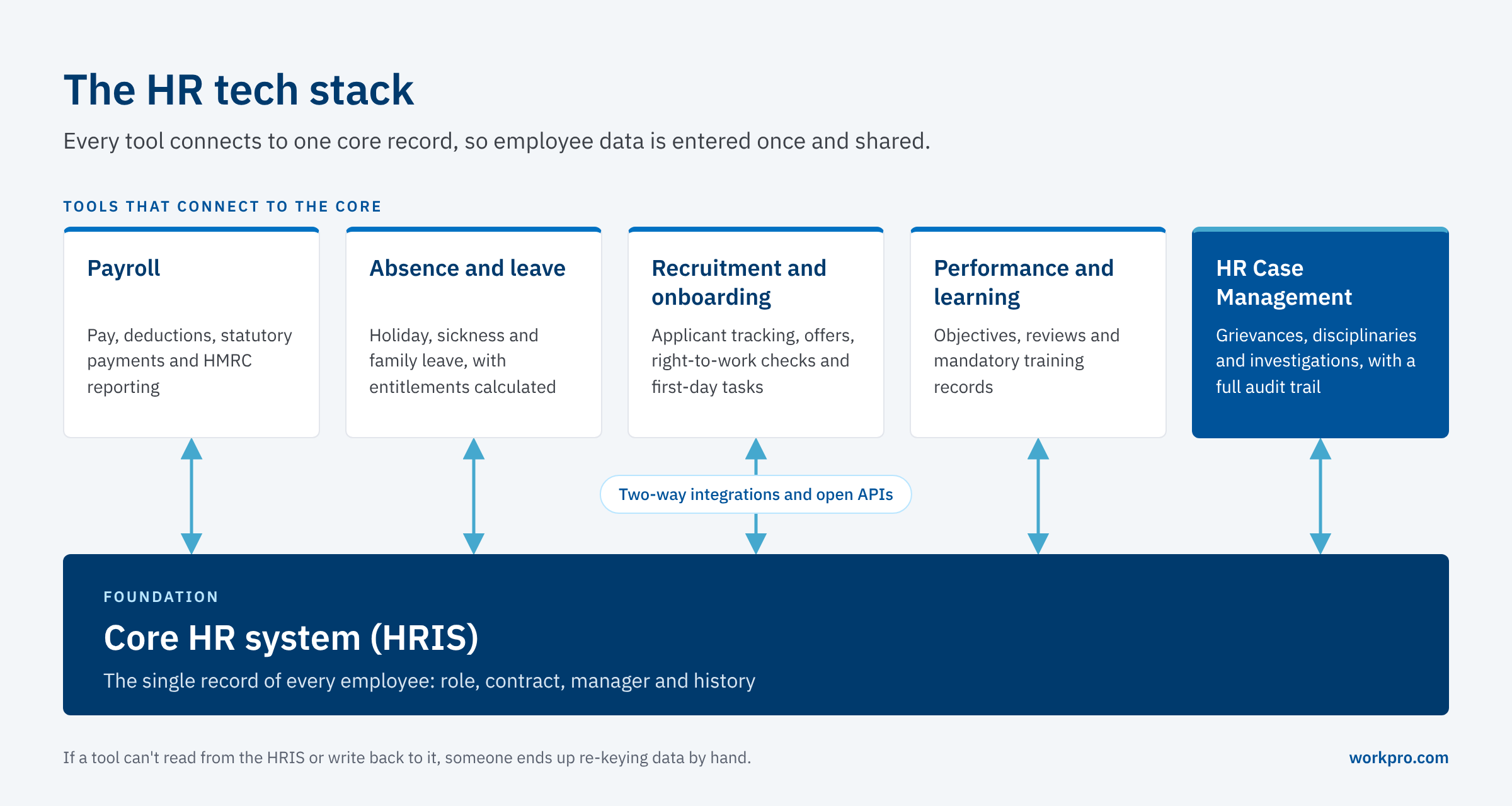
In most large organisations, the stack has six layers:
-
Core HR system (HRIS): the single record of who works for you, their role, contract, manager and history. Everything else draws from it.
-
Payroll: pay, deductions, statutory payments and HMRC reporting.
-
Absence and leave: holiday, sickness and family leave, with entitlements calculated automatically.
-
Recruitment and onboarding: applicant tracking, offers, right-to-work checks and first-day tasks.
-
Performance and learning: objectives, reviews, mandatory training and compliance records.
-
Employee relations and case management: grievances, disciplinaries, investigations, absence cases and appeals, with a full audit trail.
The HRIS is the foundation and integration is the key. If your other tools can't read from it or send data back to it, your team will still be entering data by hand. With HR burnout levels at an all time high, that’s something you really want to avoid.
Assemble With Intention
The quickest way to build an inefficient stack is to start with a vendor shortlist. While comparison sites are useful for spotting options, many rank vendors partly on paid placement so a pinch of salt is required.
Start instead with a short, honest list of what is going wrong. Where does HR time go each week? Which processes rely on one person's memory? Where would you struggle if a tribunal asked for records?
Each answer points to a layer of the stack. If payroll errors come from absence data being re-typed, the fix is an integration, not a new payroll provider. If grievance timelines keep slipping, that is a case management problem. Prioritise by risk by hours wasted, then buy tools in that order.
It's also worth looking beyond the largest vendors. Smaller, specialist providers often configure their product to fit your process, rather than asking you to change your process to fit the product.
What You Need At 50, 100 and 500+ Employees

There's no fixed number of tools a company "should" have. What changes with size is how much risk and how much admin a gap creates. Below is a suggested sensible order of priority.
Around 50 employees
At this size, the essentials are a core HR system with absence recording built in, and a payroll provider that connects to it. Many HRIS products include basic onboarding and document storage, which is enough for now. Employee relations cases are rare, but write down how you handle them, and keep notes somewhere secure and access-controlled, not in personal inboxes.
Around 100 employees
This is usually where the cracks start to show. HR is often one or two people, managers are less experienced, and cases happen often enough that inconsistency becomes visible. A typical 100-person stack adds:
-
Recruitment and onboarding tools, if hiring is steady
-
Performance and learning tools, particularly where mandatory training must be evidenced
-
A structured way to manage employee relations cases, so every grievance and disciplinary follows the same steps and timescales
Check that everything talks to the HRIS and that two systems are not trying to do the same thing. Consolidating overlapping tools often saves more than adding new ones.
500 employees and beyond
Larger organisations need reporting across sites and teams, more granular permissions, and evidence they can produce on demand. A dedicated HR case management system becomes hard to do without, as volumes rise and cases are handled by more managers in more locations. Integration with payroll and the HRIS through open APIs matters more here, because the cost of manual re-entry increases with headcount.
The same logic applies after a funding round or rapid growth phase. Fix the foundations before adding specialist tools, because every new hire makes a weak core system harder to replace.
How to Judge Each Tool Before You Buy

Once you know which layer you're buying for, test every option against the same criteria.
Ease of use
If managers find a tool awkward, they'll work around it or avoid it and your data will be incomplete. Trial it with the people who will use it day to day.
Integration with your core system
You want a stack that works as one. Check whether a tool has a pre-built integration with your HRIS and payroll, or an open API your team or provider can use. Ask which data moves, and in which direction(s).
Automation that supports judgement
Automated reminders, workflows and templates save time and reduce missed deadlines. They should not make decisions that need human judgement, particularly in employee relations. The best tools guide people through a fair process and leave the decisions firmly with them.
Security and data protection
HR systems hold some of the most sensitive data an organisation has. "Cloud-based" tells you nothing about how secure a product is. The ICO's guidance on using employment records expects employers to make sure "any processor you use adopts appropriate security measures, both technical and organisational." Primary certifications to look out for are:
ISO/IEC 27001: The international standard for information security management. A certified supplier has put in place a formal information security management system (ISMS): a risk-based framework of policies, people and technical controls that protects the confidentiality, integrity and availability of the data it holds. Certification is issued by an independent, accredited certification body.
Cyber Essentials Plus: The UK government-backed scheme run by the National Cyber Security Centre. It covers five technical controls with independent technical testing of the supplier's systems to confirm those controls are working in practice.
Beyond certifications, ask where data is hosted and how access is controlled at record level.
Reporting you can act on
Look for configurable dashboards that track your own KPIs, such as case volumes, time to resolution and absence trends. If a report has to be built in a spreadsheet every month, the tool isn't doing its job properly.
The total cost of the stack
A cheap tool that needs manual workarounds can cost more in the long term than a more expensive one that integrates well with your main system. Budget for the whole stack, including implementation and training, so the most money goes to the layers that carry the most risk.
Where HR Case Management Fits
Case management is often the last layer added and the first one tested under pressure. A grievance or disciplinary case that ends up at an employment tribunal will be judged on process. Under theAcas Code of Practice on disciplinary and grievance procedures, tribunals can adjust awards by up to 25% where an employer has unreasonably failed to follow the Code. In addition, Acas has consulted on an updated Code, with more emphasis on early and informal resolution, in a consultation that closed in September 2026.
Most HRIS products store documents against an employee record. Few are set up to manage a case: the stages, the timescales, who can see what, and a timestamped record of every action. That gap is usually filled by email, shared folders and spreadsheets, which is where consistency breaks down. We've covered the trade-offs in more detail in Case Management: HR Software vs. Spreadsheets.
With the shorter unfair dismissal qualifying period coming into play, decisions about newer employees will need the same documented process as everyone else, and probation periods will carry more risk.
Workpro Fills The Gap

You Workpro is built for the employee relations layer of the stack. It sits alongside your HRIS and payroll, and handles the cases those systems were never designed to manage. It’s suitable for companies with over 500 employees, and works particularly well when numbers reach upwards of 1,000.
-
Configurable workflows set out each stage of a grievance, disciplinary or investigation, with timescales and permissions that follow your policy and the Acas Code.
-
Template letters and guided steps help managers handle cases consistently, while decisions stay with the people responsible for them.
-
A complete audit trail records every action, document and decision against the case, so you can show what happened and when.
-
Case-level access control means sensitive details are only visible to people who need them.
-
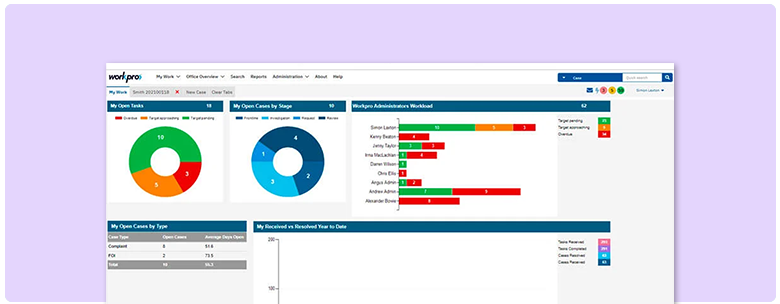
Reporting and dashboards show case volumes, durations and trends across the organisation, so patterns are visible before they become problems.
-
Flexible APIs and data feeds connect Workpro to your HRIS and payroll, so employee data is only entered once.
You can see the full list on our features page, and our guide to what a good employee case management system should have sets out what to look for, whichever supplier you choose.
A good HR tech stack is built in order: a core HR system that everything else connects to, then the tools that remove the most risk and admin at your current size. Start with the problems, judge every tool against the same criteria, and count the cost of the whole stack rather than individual products.
With the harassment rules changing in October 2026 and unfair dismissal rights widening in January 2027, the employee relations layer is one to prioritise. Organisations that can show a consistent, documented process for every case will be in a far stronger position than those piecing records together from inboxes after a claim arrives.
Frequently Asked Questions
What is an HR tech stack?
An HR tech stack is the combination of software an HR team uses to manage people from hiring to leaving. It usually includes a core HR system (HRIS), payroll, absence management, recruitment and onboarding, performance and learning tools, and employee relations case management, all connected so that data is shared rather than re-entered every time.
What HR tech stack does a 100-person company need?
A 100-person company typically needs a core HRIS with absence management, integrated payroll, onboarding, and a structured way to manage employee relations cases such as grievances and disciplinaries. Performance and learning tools become worthwhile if training must be evidenced. The priority is making sure every tool connects to the HRIS.
How many HR tools does a growing company need?
There's no set number. Many organisations of around 50 people manage with an HRIS and payroll. By 100 employees, most need separate tools for recruitment and learning and by 500+ they need HR case management. Fewer, well-connected tools are better than many overlapping ones.
What should a company add to its HR stack after a funding round?
Fix the foundations first. A core HRIS and integrated payroll should be in place before rapid hiring starts, followed by recruitment and onboarding tools to handle the volume. As headcount grows, add HR case management so employee relations issues are handled consistently across new managers.
How do you consolidate HR tools?
List every tool, what data it holds and who uses it. Identify overlaps, such as two systems storing employee records, and tools that don't integrate with your HRIS. Retire or replace those first, moving data into the core system or a connected specialist tool.
Do smaller organisations need HR case management software?
Not always at 50 employees, but the requirement can grow quickly. Once cases are frequent enough that different managers handle them differently, or records sit across email and shared drives, a dedicated case management system like Workpro helps you follow a consistent, documented process that stands up at a tribunal.